Press kit
Gander
An Android file viewer that opens PDF, Word, Excel, PowerPoint, photos, video, audio and Markdown, and renders all of it on the device. It requests no Android permissions at all.
Page updated 29 September 2026 · On Google Play since 29 September 2026 · Current release 2.0, 26 September 2026 · Nothing here is under embargo
The story, in one test anyone can run
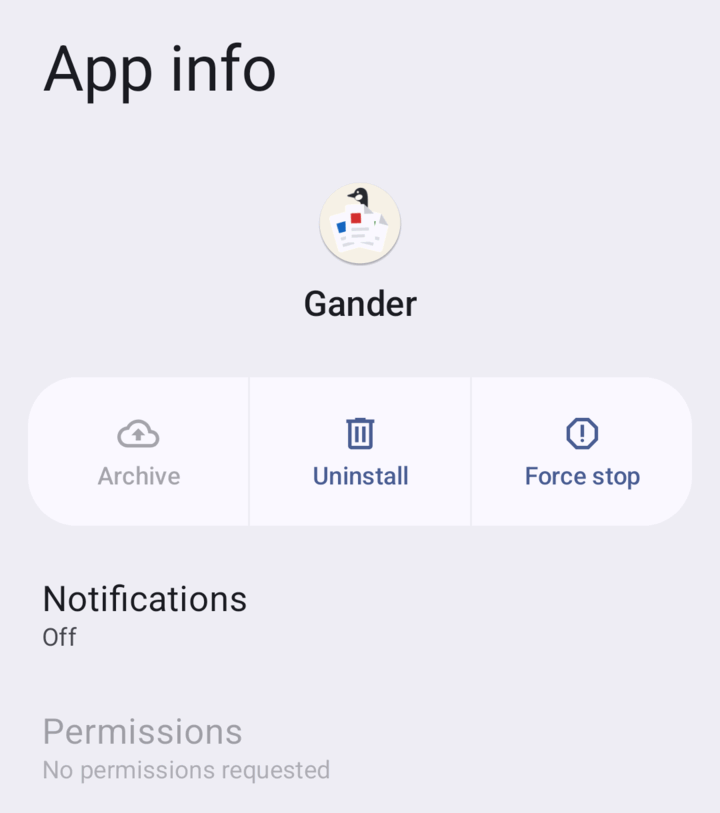
Open the permissions page of whatever you read PDFs with, then open Gander's.
Android's own App permissions screen for Gander is empty. It requests nothing, and its manifest
does not contain INTERNET, so it has no route to send a document anywhere.
That is not a privacy policy. It is a missing capability, and it takes about twenty seconds to verify on your own phone without trusting anyone.
The absence is enforced rather than intended: the release build fails if any permission reaches the merged manifest, so it cannot drift back in through a dependency. The About screen inside the app asks Android at runtime what the app requests and shows you the answer.
It also cannot change its mind later. There is no internet permission through which to load an advertisement, and no billing library that would get past the app's own build gate.
The facts
| Name | Gander |
|---|---|
| What it is | An offline file viewer for Android. A viewer, not an editor. |
| Current release | 2.0, released 26 September 2026. The GitHub APK is versionCode 21; the Play build carries 22, one above, so that Play offers an update rather than "Installed" to anyone who sideloaded the same version. All releases and changelogs |
| Formats | PDF; Word (.docx and Word 97-2003 .doc); OpenDocument text (.odt); Rich Text (.rtf); Excel (.xlsx, .xls, .xlsm, .xlsb, .csv, .ods); PowerPoint (.pptx); JPG, PNG, WebP, HEIC, BMP, GIF, SVG, AVIF; MP4, MKV, WebM, MOV; MP3, M4A, FLAC, WAV, OGG, Opus; Markdown, plain text and source code; zip archives (.zip); 3D models (.stl) |
| Permissions | None |
| Network | No INTERNET permission. No ads, trackers, analytics, crash reporting or accounts. |
| Price | Free. No in-app purchases, no subscription. |
| Licence | MIT |
| Download size | 5,270,449 bytes for 2.0, so about 5 MB. One build for every processor, no native libraries. |
| Requires | Android 8.0 or newer (minSdk 26). PDF rendering needs Android System WebView 125 or newer, and the app says so plainly if yours is older. |
| Developer | Arjun Maniyani, working alone, in India |
| First release | 19 July 2026. Twenty releases to date. |
| Reach | 13,879 APK downloads and 1,093 GitHub stars (read 29 Sep 2026). Its Show HN reached the Hacker News front page on 31 July 2026, with 211 points. |
| Source | github.com/mokshablr/gander |
| Site | arjun.maniyani.com/gander |
| Privacy policy | arjun.maniyani.com/gander/privacy.html |
| Google Play | play.google.com/store/apps/details?id=com.arjun.gander |
| Google Play | Not live yet. The APK on GitHub is the current route. |
Boilerplate, copy it verbatim
Written to be pasted without editing and to survive being quoted out of context. No permission needed, no credit line required.
Short, 44 words
Gander is a free, open-source file viewer for Android that opens PDF, Word, Excel, PowerPoint, images, video, audio and Markdown entirely on the device. It requests no Android permissions and holds no internet permission, so it has no route to send a document anywhere.
Long, 92 words
Gander is a free, open-source file viewer for Android. It opens PDF, Word, Excel, PowerPoint, images, video, audio, Markdown and source code, and renders all of it on the device. Android's App permissions screen for it is empty: it requests no permissions at all, and its manifest does not contain INTERNET, so it is structurally unable to upload a document. There are no ads, trackers, analytics or accounts, and no in-app purchases. It is about 5 MB, runs on Android 8.0 and newer, is MIT licensed, and is written by one person, Arjun Maniyani.
Assets
Everything below is on this page so that a tip form with no attachment field is still enough. Individually linked, and all of it as one ZIP (about 3.6 MB). Usage rights are in the next section, and the answer is yes.
The permissions screenshot
Icon and wordmark


Icon: PNG, 512×512, transparent, 77 KB.
Wordmark: SVG ·
PNG, 1200×290, transparent.
For dark backgrounds: SVG ·
PNG. The face is Jost.


Screenshots
Clean captures at 1080×1920, with no marketing copy over them. The documents in every frame are synthetic, written for these shots; the photograph is a CC0 aerial by Wilfredor. So there is no third-party rights holder in any of them.

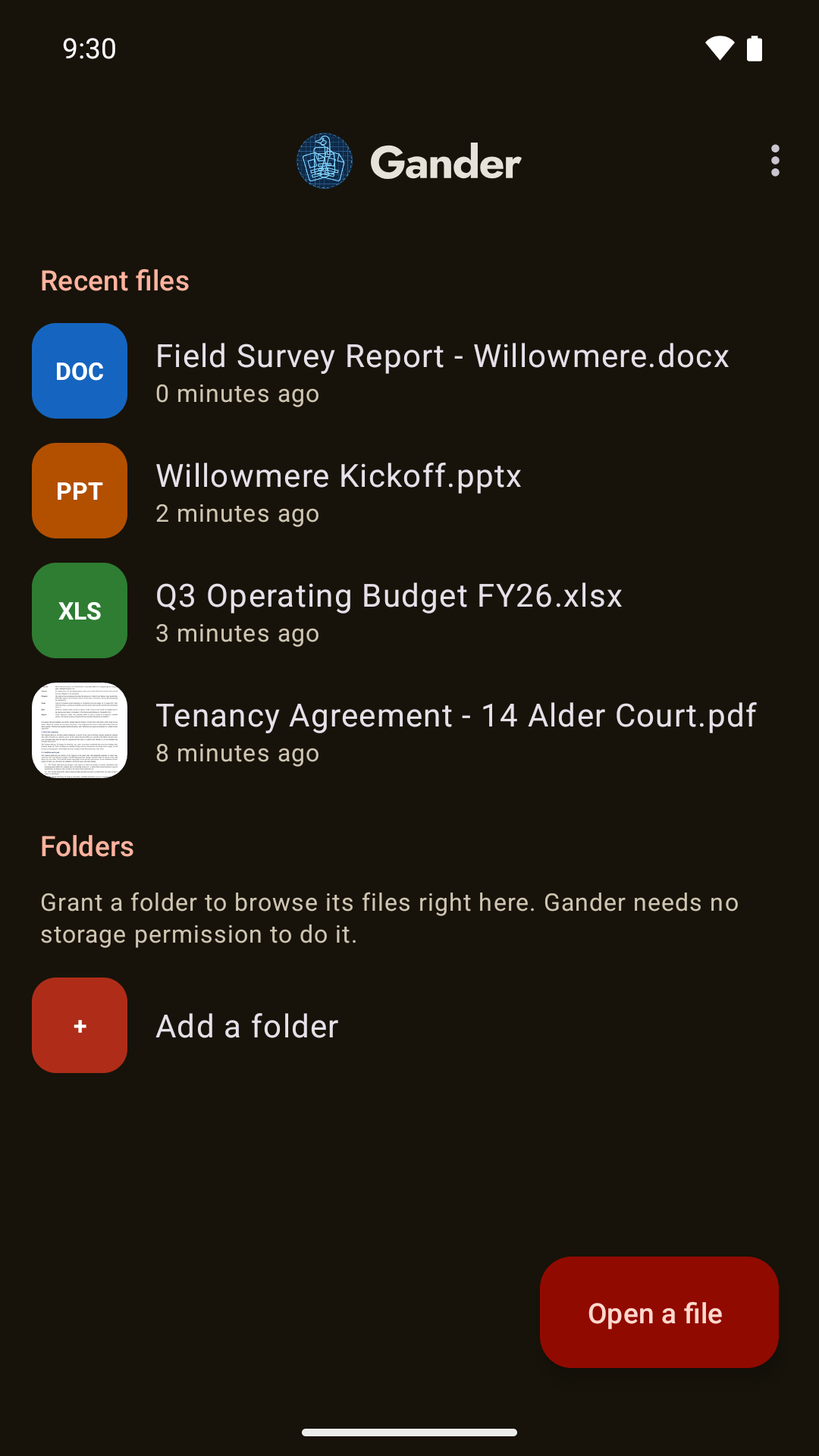 Home and recent filesPNG 1080×1920, 157 KB
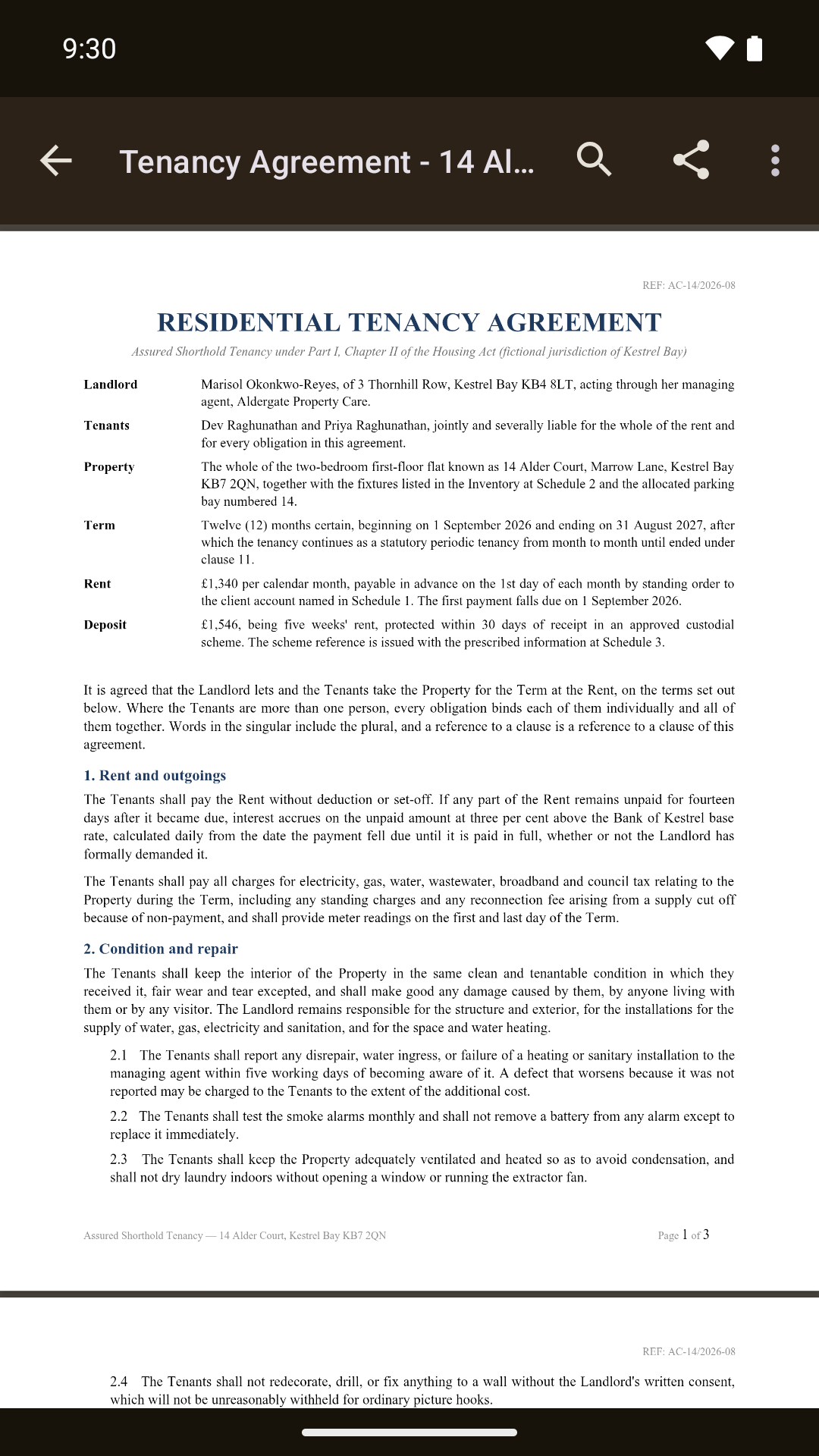 A PDFPNG 1080×1920, 518 KB
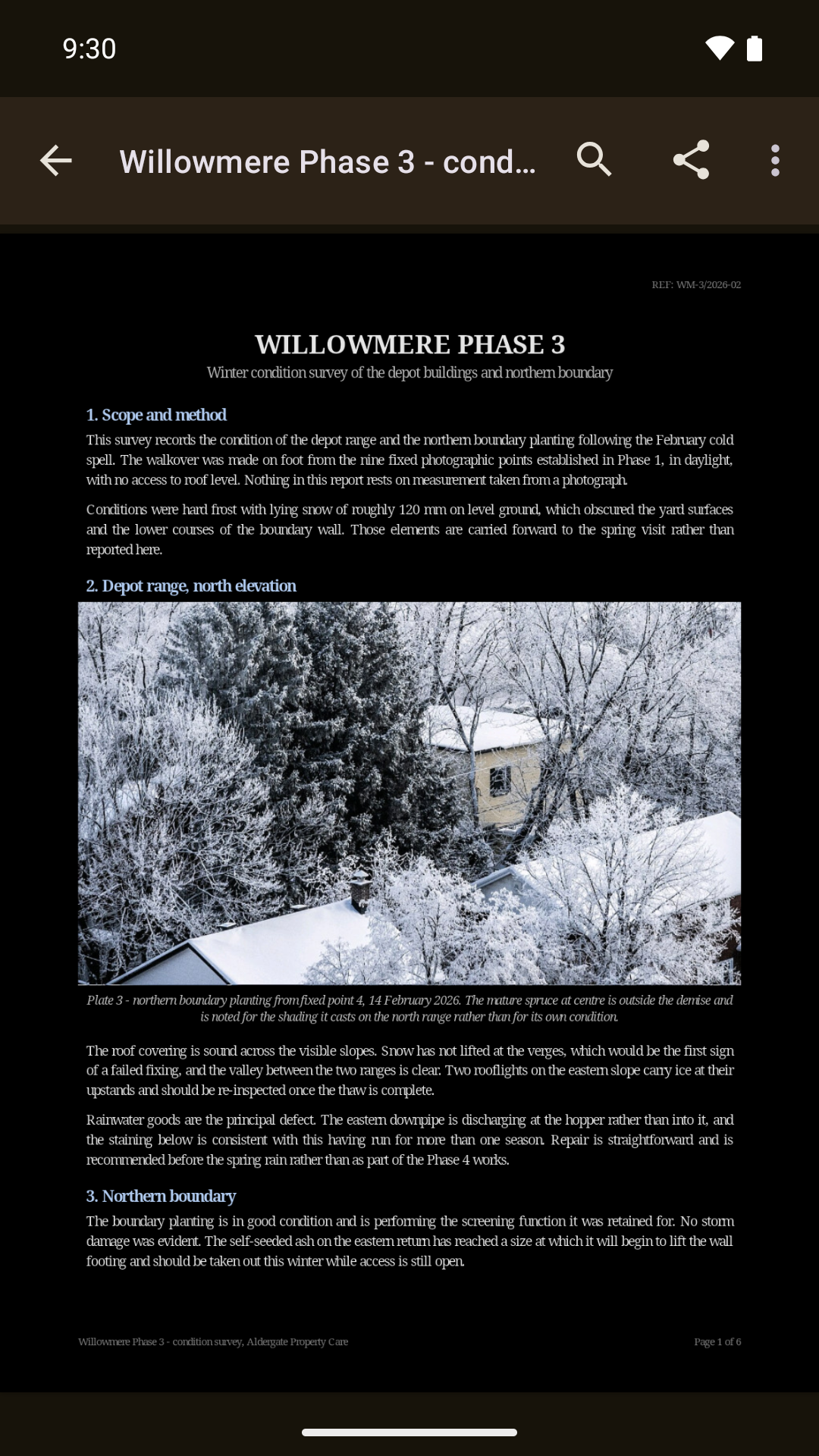 The same PDF, night modePNG 1080×1920, 1.5 MB
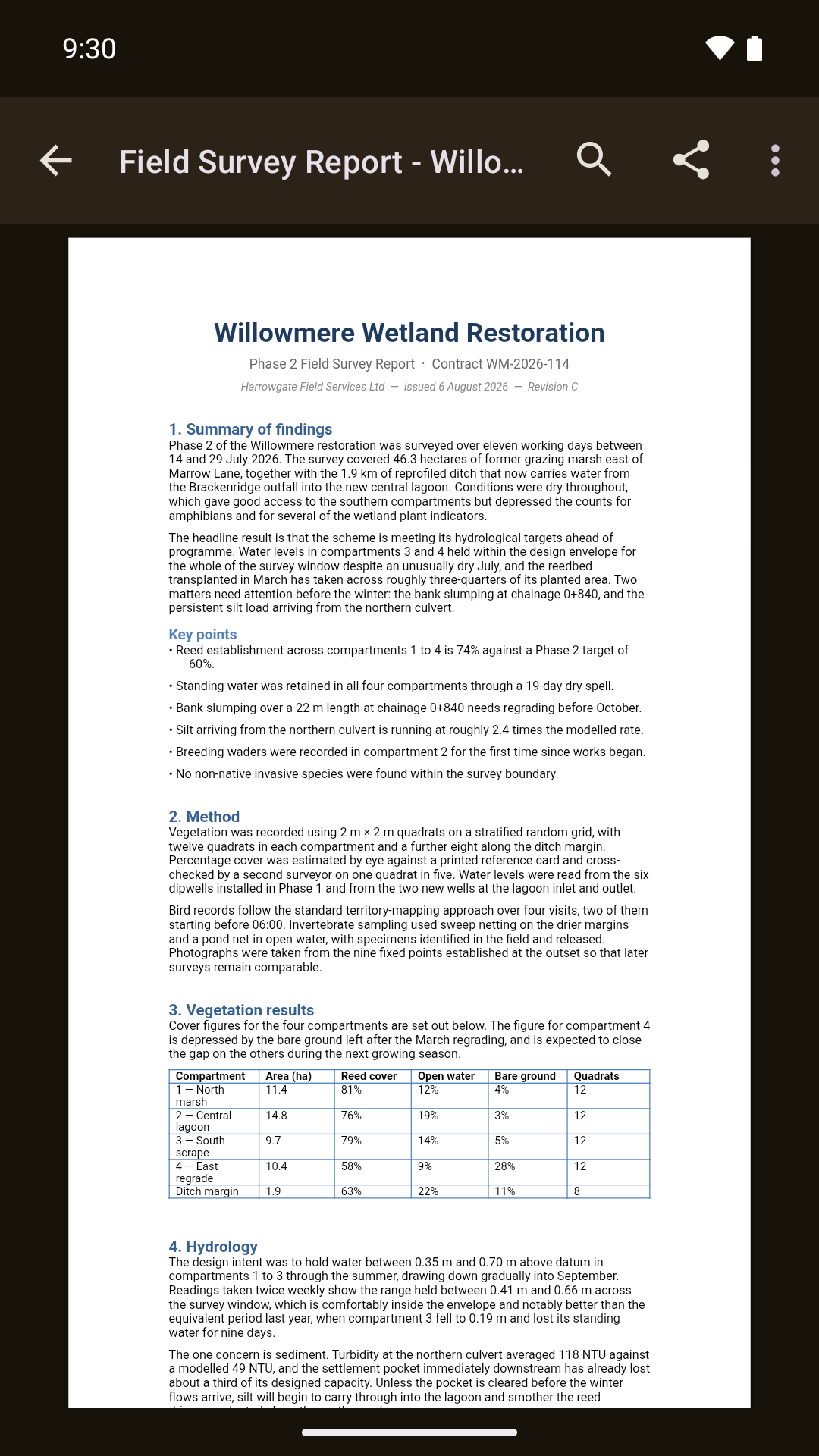 A Word documentPNG 1080×1920, 369 KB
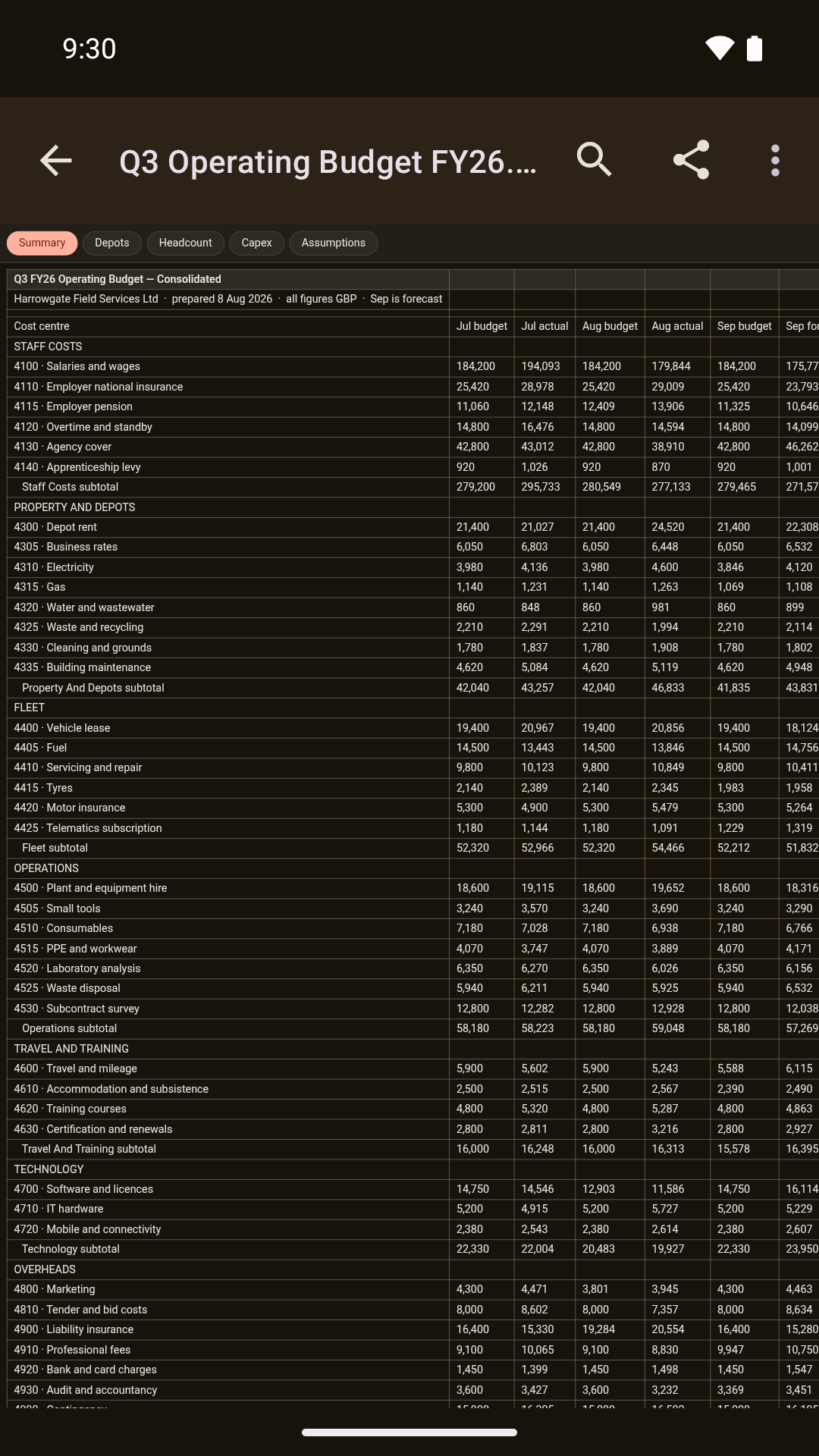 A spreadsheetPNG 1080×1920, 340 KB
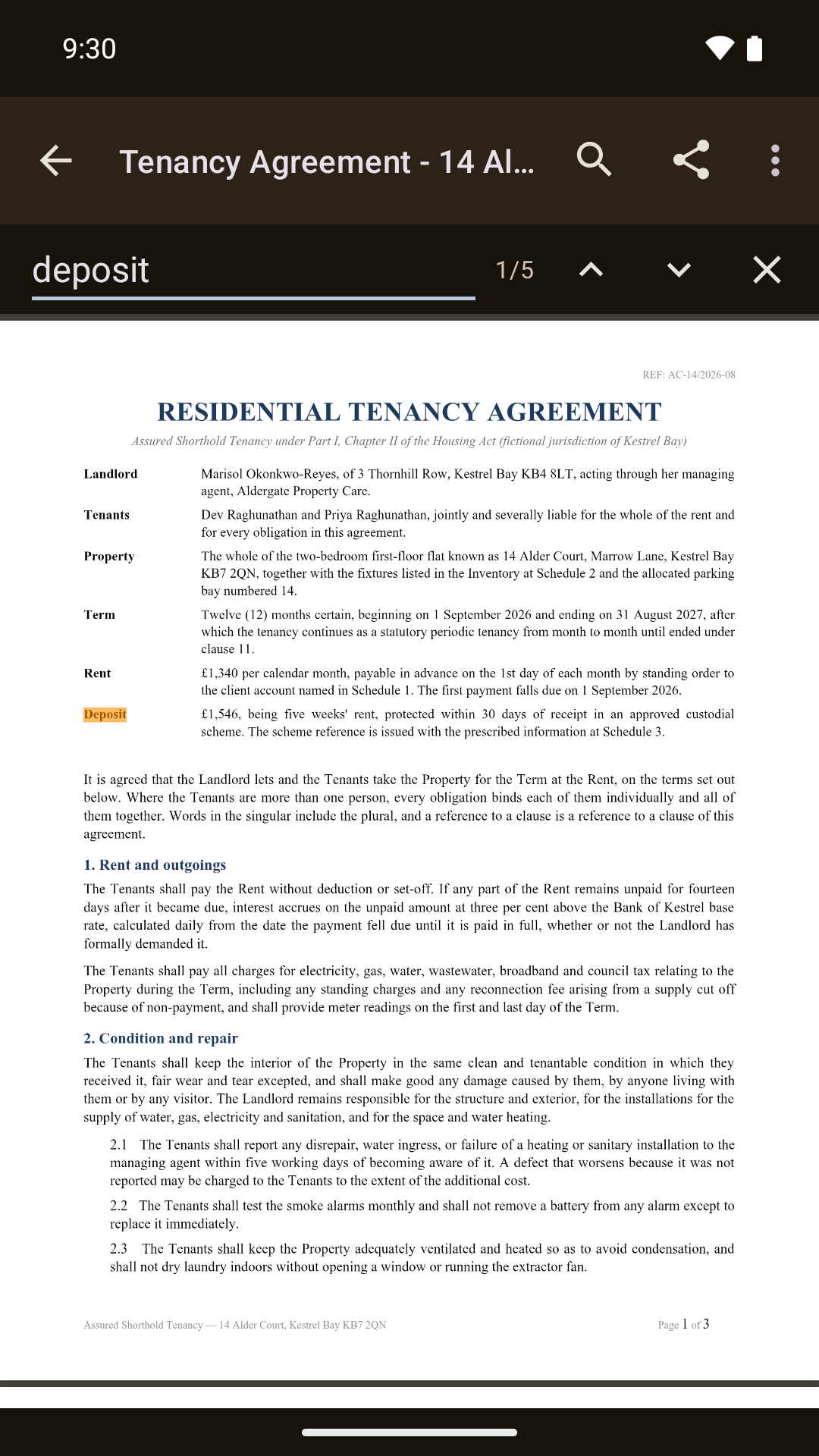 Find in documentPNG 1080×1920, 537 KB
Tablet screenshots at 2560×1600 and the rest of the store set are in the
repository under fastlane/metadata/android/en-US/images/, or ask and they will be
sent.
Feature graphic
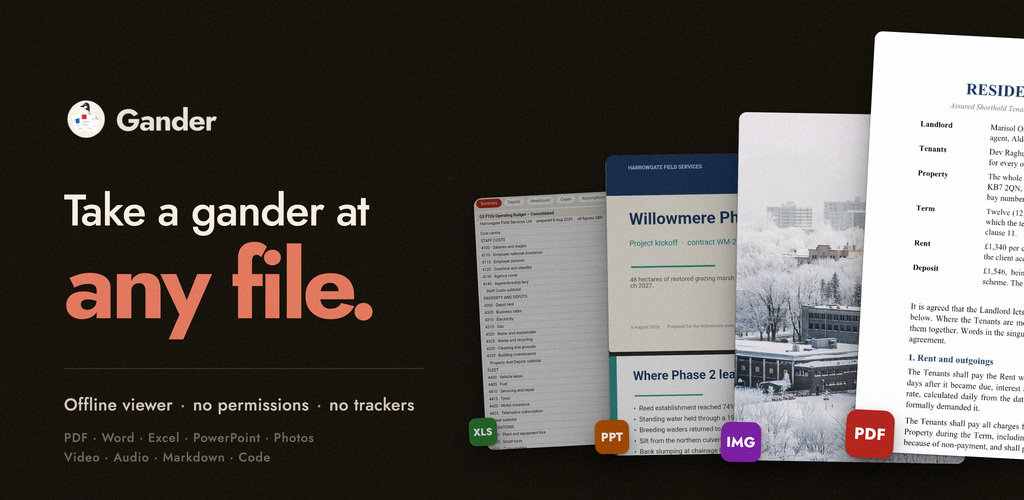
JPG, 1024×500, 206 KB. The Play store banner, useful as an article header.
Video
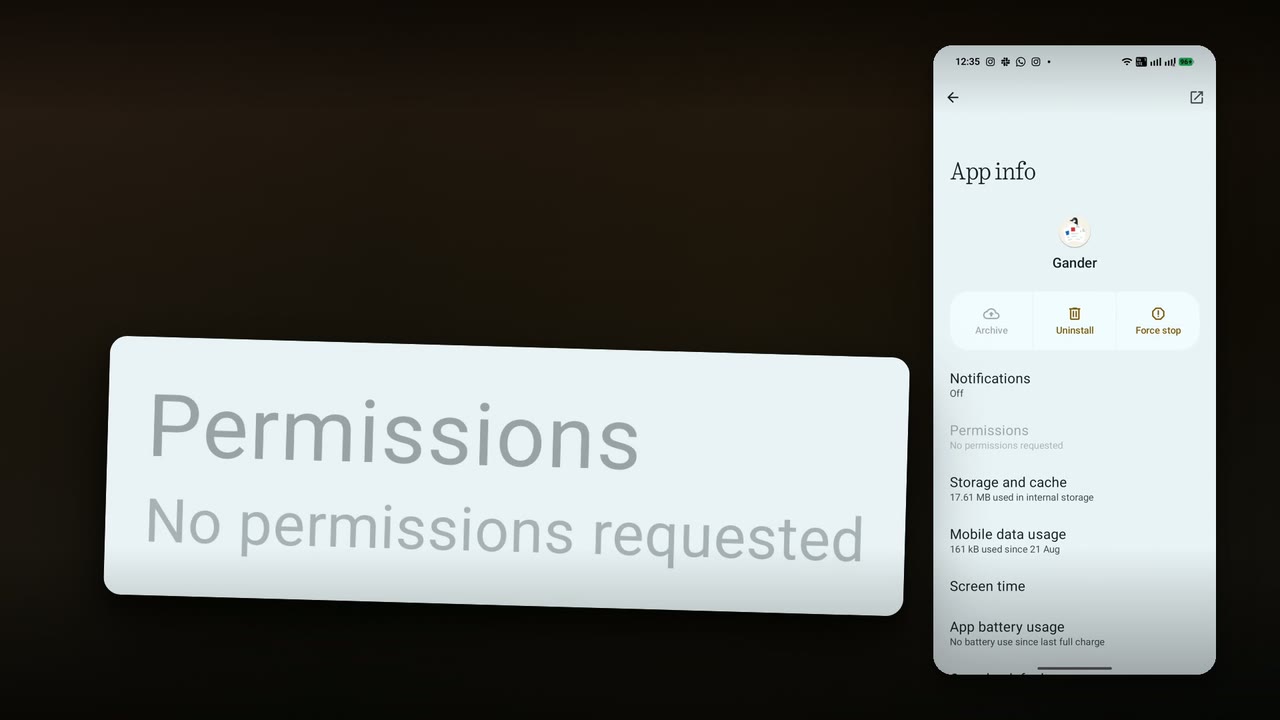
A 12-second permissions clip. One instruction, then the phone: out to the home screen, into Android’s Settings, and onto the App info page for Gander. That journey is a single continuous screen recording with no cut anywhere in it, which is the point of the clip: what the page says is Android’s account of the app, not ours. The one row that matters is enlarged alongside the phone, from a higher-resolution capture of that same screen rather than redrawn. It is silent, deliberately: the cut is built to be read, so it carries its whole argument under your own voiceover or in a muted autoplay.
A 30-second version that puts the app itself either side of the same walk is the Play listing video, public on YouTube. It is silent for the same reason, and it is cut for a store listing rather than for an article, so the 12-second clip is usually the more useful one to drop into a piece.
Any Gander footage you shoot yourself is cleared for redistribution, and you may monetise the video you put it in, including on a monetised channel. You do not need to ask me first.
Rights, so you do not have to ask
The source code is MIT licensed. That covers the code and nothing else, which is why the rest of this section exists.
The screenshots, the permissions screenshot and the feature graphic on this
page are licensed CC BY 4.0. Credit
line: Gander / Arjun Maniyani. Crop and scale them freely.
The name “Gander”, the wordmark and the app icon are not covered by either of those. They are my marks. You may reproduce them, unaltered and at any size, in reporting about Gander, without asking me and without a credit line. Please do not recolour, redraw or reletter them, do not use them in a way that suggests I endorse your publication or product, and do not adopt them as the identity of software that is not Gander. Anything outside that, ask; the answer is usually yes and it comes the same day.
The Google Play badge is Google's, not mine. Take it from Google Play's own brand guidelines rather than from this page.
What it does, beyond opening files
Useful if you are writing more than a paragraph. All of this is in 2.0.
- Find in document, inside PDF, Word, Excel, PowerPoint, Markdown, text and code, with match-by-match navigation.
- Select and copy text in a PDF, and read one with a screen reader.
- Night mode for PDFs: paper goes black and text goes white, colours keep their hue, and photographs are left exactly as they were printed.
- Password-protected PDFs open by entering the password.
- Deep zoom into large photos with tiled decoding, and correct rotation read from EXIF.
- Multi-sheet workbooks with a tab per sheet.
- Share the open file onward, save a copy, or jump to the folder it sits in.
- Recent files with real thumbnail previews, and granted folders one tap away.
- Material 3, dark mode, edge to edge.
Permission entries, compared
| App | Entries 26 Sep 2026 |
Opens |
|---|---|---|
| Google Docs | 30 | Documents |
| WPS Office | 29 | Office suite |
| Microsoft Word | 26 | Documents |
| Adobe Acrobat Reader | 19 | |
| Foxit PDF Editor | 17 | |
| Xodo | 11 | |
| ReadEra | 8 | Books, PDF |
| MuPDF viewer | 2 | |
| Secure PDF Viewer (GrapheneOS) | 0 | PDF only |
| Gander | 0 | PDF, Office, images, video, audio, Markdown |
“But a permission-less app can still leak”
It can, and you are right to check. In 2012 Paul Brodeur at Leviathan Security built a proof-of-concept Android app called No Permissions that requested nothing and still exfiltrated data, by reading what was readable without a permission and then handing a crafted URL to the system browser, which has the internet permission that the app lacks. It was covered by The Verge and others, and it is the correct first question to ask anyone making this claim.
Here is what Gander does about each leg of it. All four are checkable in the source.
| The route | What Gander does |
|---|---|
| Hand a URL to the browser | A link inside a document is dropped, not forwarded.
shouldOverrideUrlLoading in ViewerActivity.kt returns true for
any host that is not the internal asset host, and does nothing further with it. There is no
path from document content to a browser. |
| Open a URL some other way | The app only ever opens three URLs: the author's site and the source repository, from
the About dialog, and Gander's own Play listing, from Rate. All three are hardcoded and each
needs a tap. The listing is the only one with an argument, and that is Gander's package name.
openUrl in MainActivity.kt has three call sites. Rate tries the
Play Store app first, with a market:// link. |
| Leave a file for another app | No storage permission. The only thing Gander writes to shared storage is a copy the user saves through the system's create-document picker. Everything else stays private to the app. The temporary copy for the share sheet, thumbnails and a copy of its licences sit in its own cache directory, and its FileProvider only covers that directory. |
| Enumerate what else is installed | The manifest declares no <queries> element, so on Android 11 and
newer the package list is not visible to it. |
A document can only leave Gander through the share sheet or “save a copy”. Both take a tap, and the user picks where the file goes.
How it works, for the technical write-up
Every renderer is JavaScript in the APK's own assets: libraries vendored unmodified, pdf.js for
PDF, docx-preview for Word, SheetJS for spreadsheets and PPTXjs for slides, and readers written
for Gander for Word 97-2003, OpenDocument, Rich Text and 3D models. They are served to a
locked-down WebView through WebViewAssetLoader, which streams the opened document
over a virtual https:// host that resolves inside the process and never reaches a
network stack.
Because nothing is ever fetched, the app needs no INTERNET permission. Because
files arrive through the system picker, an Open-with intent or a folder granted once, it needs no
storage permission either. There is no addJavascriptInterface bridge, just an HTML5
message channel. Text goes in, like a search query, and only integers come back. The outbound
intents in the whole app are the share sheet, “show this file's
folder”, “save a copy” through the system's create-document picker, the two
links in the About dialog, which do open a browser, and, from 1.17, Rate and Share in the home
screen's menu. Every one of them fires only when the user presses the thing that fires it.
The full list of vendored libraries, their versions and their licences is in VENDORED.md. There is a longer piece on the underlying question, can an app without the INTERNET permission phone home, if that is the angle.
Verify it yourself
Do not take the claim on trust. Three checks, and the exact output each one gives.
1. The permissions claim
Against a downloaded APK rather than against this page:
$ aapt2 dump permissions Gander-2.0.apk package: com.arjun.gander permission: com.arjun.gander.DYNAMIC_RECEIVER_NOT_EXPORTED_PERMISSION uses-permission: name='com.arjun.gander.DYNAMIC_RECEIVER_NOT_EXPORTED_PERMISSION'That is the whole output, and the one entry in it is not what it looks like.
DYNAMIC_RECEIVER_NOT_EXPORTED_PERMISSION is not an Android permission. It is a
permission the app defines for itself, injected automatically by the AndroidX libraries
so that a component can register a broadcast receiver without exporting it. It is signature
level, self-granted, namespaced under the app's own package, and it grants nothing to anybody.
It is why Android's App permissions screen is still empty.
The build refuses to ship anything else.
app/build.gradle.kts asserts on the merged manifest and fails the release build
on any permission not on a one-item allowlist, which is that entry, with the reason written next
to it. If you see a second uses-permission line, you are not looking at a Gander
release build, and I would like to know.
2. The signature
$ apksigner verify --print-certs -v Gander-2.0.apk Verifies Number of signers: 1 V2 Signer: certificate DN: CN=Gander, OU=Personal, O=Arjun V2 Signer: certificate SHA-256 digest: 5b5cf64a94237cd5f0e085760038bc1cebdf18daba5cb3eaca7c159f22a7e24bThe signing certificate SHA-256, in the grouped form:
5B:5C:F6:4A:94:23:7C:D5 F0:E0:85:76:00:38:BC:1C EB:DF:18:DA:BA:5C:B3:EA CA:7C:15:9F:22:A7:E2:4BTools print it colon-free and lowercase, which is the same value: 5b5cf64a94237cd5f0e085760038bc1cebdf18daba5cb3eaca7c159f22a7e24b
3. The binary
Every GitHub release publishes its APK's own SHA-256 in the release body. For 2.0:
235b1b9bd8f272adedacc74e949e1df4077cc687401343a6edd1113a230595b4 Gander-2.0.apkWhat these checks do not prove
They prove the APK you have is the one I signed, and that it declares no Android permission. They do not prove the binary was built from the source in the repository. Gander is not yet bit-for-bit reproducible, and the outstanding work is the vendored minified renderers, which is also what currently keeps it off F-Droid. What you can check today is the manifest, the signature and the source.
The Play build and the GitHub release carry the same app signing key. That is the key Google Play publishes under App integrity, and its SHA-256 is the value above. If an APK you pulled off a device shows a different digest, it came from neither route.
If you are reviewing it, five minutes
In this order. The first one is the story and takes twenty seconds.
- Install it, then open Android Settings, Apps, Gander, Permissions. The row is greyed out. Compare against whatever else opens PDFs on that phone.
- Turn on aeroplane mode and use it normally. Nothing changes, because nothing was ever going out.
- Send yourself a PDF on WhatsApp or in email and tap it. It opens straight into the document: no splash, no account, no sign-in wall.
- Open a long PDF and scroll hard, then pinch deep into a page. Then turn on night mode and find a page with a photograph on it: the paper inverts and the photograph does not.
- Try to break the premise. Look for a settings screen that asks for an account, an upload button, a share-to-cloud. There is a share sheet, which hands the file to whatever you pick, and that is the only way a document leaves.
The honest failure cases are in Honest limits, so you do not have to hunt for them.
Honest limits, and four things people get wrong
Stated here so you do not have to find them yourself. All of it is on the store listing before anyone installs.
- It is a viewer, not an editor.
- Legacy binary
.pptdoes not open, because no open-source renderer for it is both faithful and small enough to bundle. Binary.xlsand.docdo open. - Complex PowerPoint decks render approximately, and spreadsheet charts are not drawn.
- PDF rendering needs Android System WebView 125 or newer. On Android 8 and 9 the last WebView those devices will receive is Chromium 138, so this is a real ceiling rather than a temporary one.
- It is not on F-Droid yet. The renderers are vendored as minified upstream builds, which F-Droid will not accept, and un-minifying or building them from source is the outstanding work.
Corrections, if the draft says otherwise
- Gander is not a file manager. It never browses the phone on its own. It opens the file or folder you hand it, which is the reason the permissions page is empty, and it will not become one.
- “No permissions” is not “permissions you can revoke”. There is nothing to revoke. Nothing was ever requested.
- The absence of INTERNET is a build-time gate, not a policy. It is asserted by the build and fails it, rather than promised in a document.
- It is not a security product and does not claim to be. It is a viewer that cannot reach the network.
What people have said
All four are public and quoted as written, each linked to its source.
“Permission path beats feature list.”
Pedro de Sousa Avelino, on LinkedIn
“You built an excellent tool to solve a real-world problem: being able to open files on the fly without granting internet access and without having to install 400 MB bloated suites that track everything.”
chesscoachx, Hacker News
“The app is pleasingly very responsive. I don't think I've used anything else on Android that lets me open and close PDFs rapidly without getting bogged down.”
array4277, Hacker News
“I was able to open the prior 117 MB 520 page PDF without a problem, and could also scroll straight through from page 1 to the end at page 520. […] No crash, no error.”
mjschwart, closed tester, on GitHub
Background
First public release 19 July 2026, and twenty releases to date, the current one being 2.0 on 26 September 2026. Until it went live on Google Play on 29 September 2026 it was distributed only as a GitHub APK, which is how it reached 13,879 downloads and 1,093 stars (read 29 Sep 2026) without a store listing. Google Play requires a personal developer account to run a closed test of at least twelve people for fourteen continuous days before it can publish; that test ran through August and September 2026, and the tester group now has 77 members.
It is written by one person, Arjun Maniyani, in India, alongside a job. If you want the why in his own words rather than mine, ask him; it is not written down here because putting words in his mouth is the one thing this page will not do.
Contact
Arjun Maniyani · gander@arjun.maniyani.com · github.com/mokshablr
Email is the surest route, and most press mail is answered the same day, including the awkward kind. I am in India (UTC+5:30), so a mail sent from London before lunch, or from New York in the morning, usually has a reply waiting.
No embargo on anything here, so nothing needs agreeing before you write.
If you want a detail that is not on this page, ask rather than guessing: everything here is meant to be checkable, and a wrong number helps nobody. If you would rather be told when a version ships, say so and you will get a line of email per release, roughly monthly, and nothing else.
arjun.maniyani.com/gander/press/