Android · Open source
Take a gander at any file.
A file viewer that cannot phone home
Gander will not send your documents anywhere. Not as a promise it makes, but as a capability it does not have.
Join the closed testor download the APK
Every phone ships with a dozen half-viewers that bounce your documents through a cloud service to render them. Gander is the opposite: one small app that opens PDFs, Word documents, spreadsheets, slides, photos, video, audio, Markdown and code entirely on the device. It holds no permissions at all, including the one it would need to reach the network.
- 0
- Permissions
- 0
- Ads or trackers
- 5 MB
- Download
- 100%
- Offline
01 What it opens
PDF · Word (.docx) · Excel (.xlsx,
.xls, .csv, .ods) · PowerPoint
(.pptx) · Photos (JPG, PNG, WebP, GIF, HEIC, SVG and more)
· Video (MP4, MKV, WebM, MOV and more) · Audio (MP3, FLAC, WAV,
OGG and more) · Markdown · Text, JSON and code files.
In your file manager, tap any file and choose Open with > Gander. Or open Gander and pick a file, or grant it a folder to browse. It runs on Android 8.0 and up.
02 How the zero-permission trick works
Gander receives files through the Storage Access Framework and "Open with" intents, so Android hands it exactly the documents you chose and nothing else. That is why it needs no storage permission: it never goes looking.
Office formats render inside a locked-down WebView whose every request is intercepted. The rendering libraries load from the app's own assets and the document streams straight from the file you picked. No network stack is ever touched, and the app does not declare the INTERNET permission, so there is nothing to audit and nothing to take on trust.
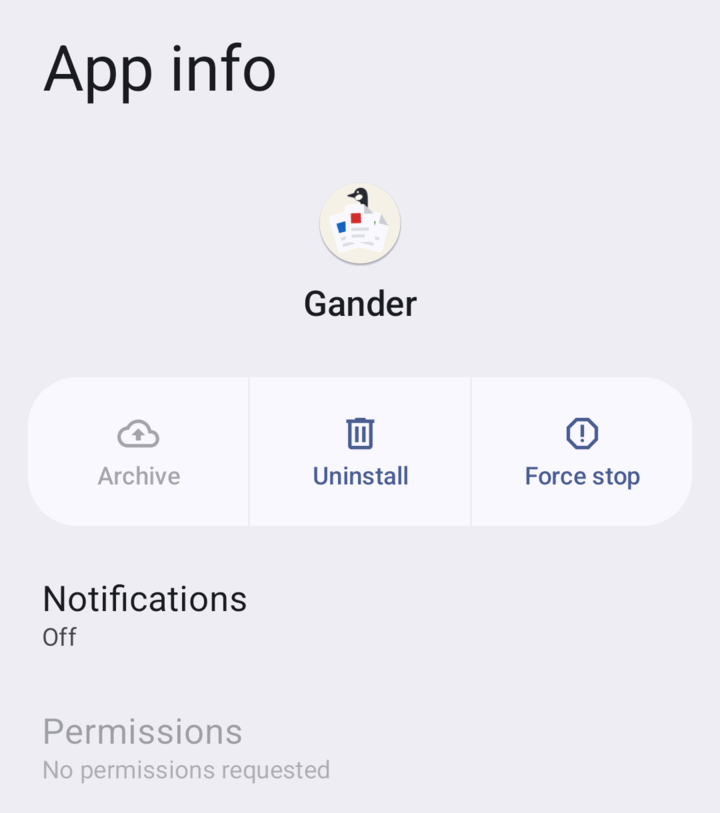
The permission list is also checked at build time: the build fails if a dependency quietly adds one. And the app's own About screen asks Android what it requests and shows you the answer. So does Android, which is the version worth looking at, because it is not Gander's account of itself:
03 What other people said
-
“Permission path beats feature list.”
Pedro de Sousa Avelino, LinkedIn -
“You built an excellent tool to solve a real-world problem: being able to open files on the fly without granting internet access and without having to install 400 MB bloated suites that track everything.”
chesscoachx, Hacker News -
“The app is pleasingly very responsive. I don't think I've used anything else on Android that lets me open and close PDFs rapidly without getting bogged down.”
array4277, Hacker News -
“I was able to open the prior 117 MB 520 page PDF without a problem, and could also scroll straight through from page 1 to the end at page 520. […] No crash, no error.”
mjschwart, closed tester, on GitHub
04 Get it
-
Join the closed test on Google Play
Google will not let a new developer account publish until twelve people have used the app for fourteen continuous days, and that is the only thing left between Gander and everyone who will never install an APK by hand. A closed test is an ordinary Play install: it updates itself, and it stays put when the app goes public.
- Join the tester group, using the same Google account your phone's Play Store is signed in to. This is the step that goes wrong quietly.
- Open the opt-in link and accept.
- Install it, and set it as your default for PDFs.
Questions go in the discussion thread.
Google PlayGander is on Google Play, and updates itself from there.
- Download the APK Grab the latest from GitHub releases. One file works on every architecture, because the app ships no native libraries. Copy it to your phone and tap it.
-
Automatic updates without a store
Install Obtainium and
add
https://github.com/mokshablr/ganderas a source. It follows the tagged releases and updates Gander like a store would. - F-Droid Requested and in progress.
05 Verify what you installed
Every release is signed with the same key, so you can confirm an APK really came from this project rather than from someone who repackaged it. Obtainium can pin the fingerprint below, and for a file you have already downloaded:
apksigner verify --print-certs Gander-x.y.apk
SHA-256
5B:5C:F6:4A:94:23:7C:D5:F0:E0:85:76:00:38:BC:1C:EB:DF:18:DA:BA:5C:B3:EA:CA:7C:15:9F:22:A7:E2:4B
06 Honest about what it is not
- It is a viewer, not an editor. It will not change your files.
- No legacy
.ppt, only the modern.pptx. - Complicated PowerPoint decks render approximately, and charts inside spreadsheets are not drawn.
- PDFs need Android System WebView 125 or newer. Gander says so plainly rather than showing you a blank page.
07 Who made it
Gander is made by Arjun Maniyani. It started as a small annoyance, which was that opening a PDF attachment on Android usually means handing it to something that wants an account first.
It is MIT licensed and the whole thing is readable at github.com/mokshablr/gander: issues and small pull requests are welcome. The zero-permission, zero-network property is the one thing that is not up for negotiation.
Using Gander at work? If your organisation wants it on managed devices, or needs something it does not do yet, write to gander@arjun.maniyani.com.
There is a sponsor page if you would like to put something behind it. Nothing in the app changes either way, and a good bug report is worth more.